Image slideshow - Mini project
Course: IS1200 - Computer Hardware Engineering, link
The project was developed on a DE10-Lite Development and Education Board, that has a RISC-V processor.
Me and my lab partner developed an image slideshow that outputs images (320×240 pixels) through VGA. The user is able to to use a settings menu to interact with the program. It is controlled by the toggle switches and the current setting is displayed on the 7-segment displays and printed in the terminal.
- The slideshow supports multiple different images.
- Adjustable image change speed.
- Displaying the current change interval on the 7-segment display.
- Blur images.
- Using interrupts for timer, button and switches.
- Play/pause function.
- Smooth transition between images. Vertical/horizontal scroll effect.
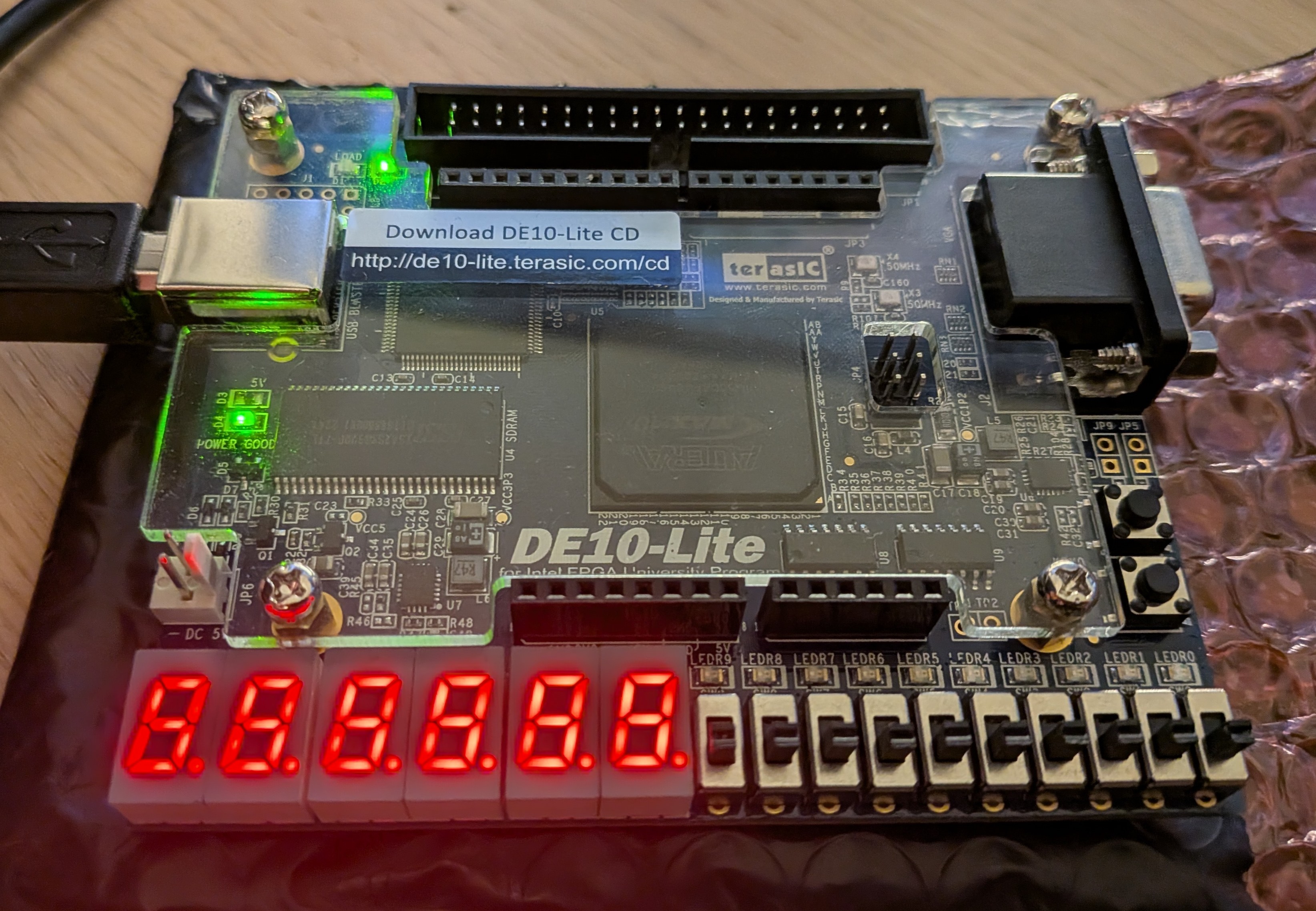
- 00 | Play & pause
- 01 | Hold duration, before next image
- 10 | Blur, on/off
- 11 | Scroll direction
The images are stored in the SDRAM sequentially and each pixel is one byte (3 bits for green, 3 bits for red and 2 bits for blue). The original image is stored first and the blurred version is stored at the memory address directly after. Since each image is 320×240 pixels each image need 320×240 bytes, so the offset between two different non-blur images is 2·320×240 bytes.
Example address mapping:
uint8_t *Image1        = (uint8_t*) 0x02000000 + IMG_W * IMG_H * 0;
uint8_t *Image1Blurred = (uint8_t*) 0x02000000 + IMG_W * IMG_H * 1;

uint8_t *Image2        = (uint8_t*) 0x02000000 + IMG_W * IMG_H * 2;
uint8_t *Image2Blurred = (uint8_t*) 0x02000000 + IMG_W * IMG_H * 3;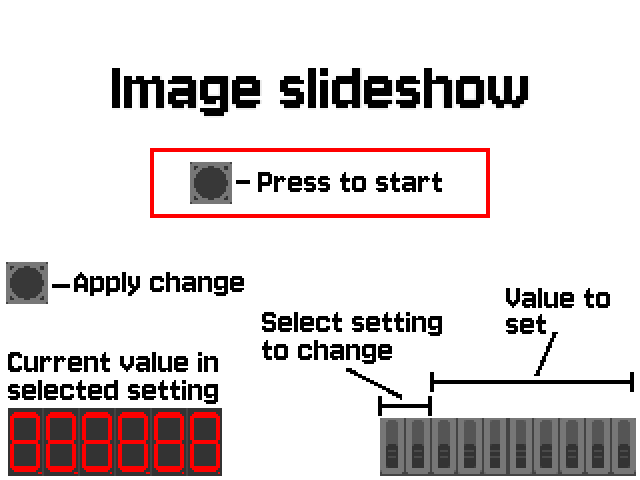
Blur is implemented by creating blurred versions of the images at the start of program. Depending on the blur radius, the processing takes some time. That's why they were initialized at the beginning and not processed every time the user wants to use blur.
The blur algorithm works by iterating through all pixels and calculating the average color within the given radius. A higher radius results in a stronger blur but takes longer to process.
Implementation example:
// Iterating through the image pixels to calculate average
uint8_t *imageToBlurDestination =  imageToBlur + IMG_W*IMG_H;
for (int pixel = 0; pixel < IMG_H*IMG_W; pixel++) {
  ...
  int sum_R = 0;
  int sum_G = 0;
  int sum_B = 0;
  int pixelCount = 0;


  int current_x = pixel % IMG_W;
  int current_y = pixel / IMG_W;
  for (int rowIndex = -blurRadius; rowIndex <= blurRadius; rowIndex++) {
      for (int columnIndex = -blurRadius; columnIndex <= blurRadius; columnIndex++) {
          // Theese cooridantes will be be the pixel sourounding the current pixel
          int x_cord = current_x + rowIndex;
          int y_cord = current_y + columnIndex;

          if (x_cord <= 0 || y_cord <= 0)
              continue;
          if (x_cord >= IMG_W || y_cord >= IMG_H)
              continue;

          pixelCount++;
          //Reads the RGB value from the current pixel.
          uint8_t pixelValue = imageToBlur[x_cord + y_cord*IMG_W];
          sum_R += (pixelValue & 0b11100000) >> 5;
          sum_G += (pixelValue & 0b00011100) >> 2;
          sum_B += pixelValue & 0b00000011;
      }
  }
  // Now all values form the sorouding pixels will be summed
  // now we divide each sum with the pixelCount to get the average. At the same time we shift the bits so it's in the correct place in the byte representation
  // pixel = RRRGGGBB
  sum_R = (sum_R/pixelCount & 0b111) << 5;
  sum_G = (sum_G/pixelCount & 0b111) << 2;
  sum_B = (sum_B/pixelCount & 0b11);

  uint8_t newPixelRGB = 0; // New pixel to update.
  // Set all rgb values to the newPixel
  newPixelRGB |= sum_R;
  newPixelRGB |= sum_G;
  newPixelRGB |= sum_B;

  imageToBlurDestination[pixel] = newPixelRGB; // Sets the current pixel to new caluclated pixel.
}

}
Interrupts
Three interrupts are used: a timer interrupt controls how long each image is shown before switching to the next one, a switch interrupt opens the settings menu, and a button interrupt applies whatever setting is currently selected. All hardware registers are memory mapped, so reading the switches and clearing an interrupt flag is done by writing directly to fixed addresses instead of calling any driver functions.
void handle_interrupt(unsigned cause){
    if (cause == 16) {  // Timer interrupt
        volatile unsigned short* timer_adress_status = (unsigned short*) 0x04000020;
        *timer_adress_status = 0;   // Clear timer interrupt
        canChangeImage = 1; // Flag for when to change to the next image
    }
    else if (cause == 17) { // Switch interrupt
        volatile int* switch_edgeCapture_adress = (volatile int*) 0x0400001C;
        show_menu();    // Show the settings menu
        *switch_edgeCapture_adress = 0x3FF; // Clear edge capture for all switches
    }
    else if (cause == 18) {  // Button interrupt
        volatile int* button_edgeCapture_adress = (volatile int*) 0x040000dC;
        applySetting();     // Apply the current settings
        *button_edgeCapture_adress = 0b1;   // Clear edge capture for button 0
    }
}
The timer period itself is also set directly through registers, calculated from how many clock ticks the chosen interval should take:
unsigned int ticks = 30000000 * (unsigned int)intervalSetting - 1;
*timer_periodL = (unsigned short)(ticks & 0xFFFF);
*timer_periodH = (unsigned short)(ticks >> 16);
Scroll transition effect
The scroll effect works by writing both the current image and the next image into the same VGA buffer at once. Each frame, one more row (or column, for horizontal scroll) is taken from the next image instead of the current one, which creates the illusion of the image scrolling off screen. The function also keeps track of whether blur is on, since the blurred version of an image is stored at a different memory offset than the original.
void scrollVertical(uint8_t *currentImage, uint8_t *nextImage){
    int pixelRowIndex = 0;
    for (int row = 0; row < IMG_H; row++){
        while(pausedSetting); // Wait here if paused

        // Shows more and more of nextImage each row, and less of currentImage
        for (int VGAindex = 0; VGAindex < IMG_W*IMG_H - pixelRowIndex; VGAindex++){
            VGA[VGAindex] = currentImage[VGAindex + pixelRowIndex];
        }
        int nextImageIndex = 0;
        for (int VGAindex = IMG_W*IMG_H - pixelRowIndex; VGAindex < IMG_W*IMG_H; VGAindex++){
            VGA[VGAindex] = nextImage[nextImageIndex];
            nextImageIndex++;
        }
        pixelRowIndex += IMG_W; // One row further into the scroll for next frame
    }
}
Note: To comply with KTH's guidelines against plagiarism, only selected code excerpts are shown for this school project, not the full submitted solution.